Summary
- AI data center design requires a different approach to compute, power, cooling, networking, and storage than traditional infrastructure.
- GPU clusters introduce higher rack densities, greater power demands, and new physical infrastructure requirements.
- AI workloads depend on low-latency networking and high-speed storage to keep GPUs productive.
- Concentrating sensitive data in AI environments creates new security and governance considerations.
- GDT helps organizations assess their existing facilities, evaluate retrofit costs, and determine the right infrastructure approach.
AI data centers vs. traditional data centers
There’s a lot of conversation about what organizations need to run AI, especially when it comes to GPUs. But one of the first questions I ask customers considering an on-premises deployment has very little to do with the GPUs themselves: Can your data center actually support them?
It’s an important starting point because AI data center design looks very different from traditional data center design. From different compute profiles to significantly higher power and cooling demands, AI data centers have different requirements for networking, storage, and security.
Unfortunately, a facility that has supported your enterprise workloads for years isn’t necessarily ready for AI. That’s why it’s critical to understand what your existing environment can support, what would have to change, and whether retrofitting the facility makes financial sense before making any large investments.
AI workloads change the infrastructure questions
Traditional enterprise data centers are designed to support a wide variety of applications, often with a strong emphasis on availability, redundancy, and predictable performance. AI workloads introduce a different set of priorities.
For example, traditional compute clusters are often distributed across racks to provide redundancy and support failover. GPU clusters, particularly those supporting intensive AI workloads, are generally designed around maximizing compute density and keeping those resources working as efficiently as possible. This results in packing more compute power into a smaller footprint and scaling rack by rack.
But the compute itself is also different. GPU clusters typically have substantially more memory and specialized processing capabilities than traditional servers. And while density can reduce the amount of floor space required, it creates a whole new set of considerations for the facility. It’s critical to look beyond the equipment you’re planning to purchase and consider if the entire environment will support it.
Power and cooling: The first big hurdles
When customers tell me they want to run AI in their existing data center, one of the first things I evaluate is the facility’s environmental capacity. There are three questions we need to answer:
- Power: How much capacity does the facility have today, how much is already being used, and can additional power be brought into the building?
- Cooling: Can the existing cooling infrastructure handle the heat generated by higher-density GPU clusters?
- Weight: Can the building and data center floor physically support the new equipment?
In my experience, power is often the biggest challenge. For decades, data centers were designed around traditional infrastructure, which have comparatively lower power requirements. AI infrastructure changes that equation significantly. And getting more power isn’t always as simple as asking the utility provider for an upgrade. In some cases, additional power capacity simply isn’t available.
Why liquid cooling isn’t a simple upgrade
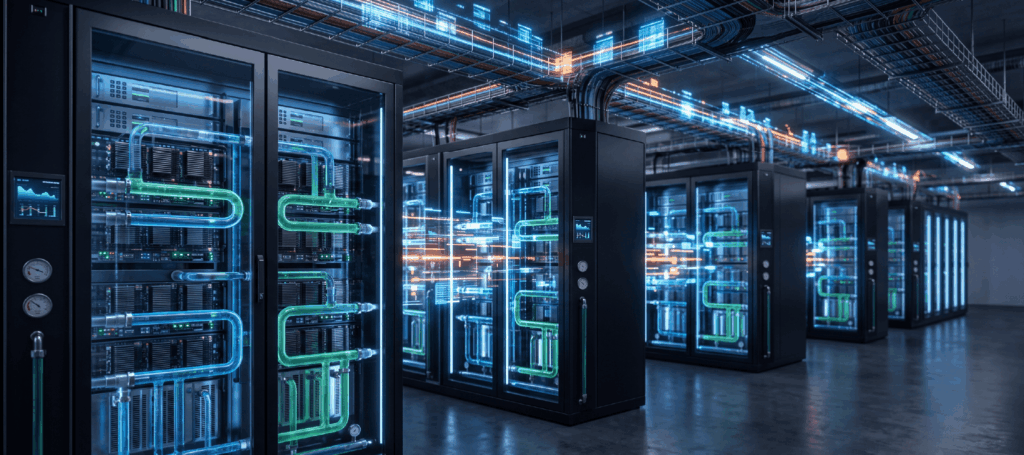
Cooling introduces another challenge, particularly as organizations move toward liquid-cooled AI infrastructure. Most traditional data centers were built around air cooling. Supporting liquid-cooled GPU infrastructure can require significant changes to the facility. And one thing that surprises customers is just how extensive those retrofits can be.
The industry is still evolving when it comes to liquid cooling standards, and not every component in an AI environment is designed for liquid cooling. For example, while certain NVIDIA GPU systems can be liquid-cooled, networking and storage equipment may still require air cooling. This scenario means accommodating two different cooling approaches within the same environment.
Before investing in liquid-cooled infrastructure, it’s important to understand what changes the facility requires and what those changes will cost.
Higher rack density changes the data center floor
Traditionally, organizations could distribute infrastructure across standard racks and plan capacity around relatively predictable power, cooling, and weight requirements. Higher-density AI racks change these assumptions.
You need to consider how power and cooling will reach the equipment, whether the floor can support the additional weight, and how the layout will accommodate installation and ongoing service. This becomes particularly interesting in urban environments, where data centers aren’t always located on the ground floor.
We work with customers whose facilities are located on upper floors of commercial buildings. That may have been a perfectly reasonable design decision 10 or 15 years ago. But when you’re considering high-density GPU infrastructure, floor loading and available power become much bigger questions. And if you’re sharing the building’s power capacity with other tenants or operations, those constraints can be even more significant.
The bottom line is that a smaller equipment footprint doesn’t automatically mean an easier deployment. Higher density can make the physical requirements considerably more complex.
AI networking requires a different approach
In a traditional enterprise environment, we spend a lot of time thinking about what’s called north-south traffic, or traffic moving between clients and servers. We’ve spent years building security and inspection capabilities around this traffic pattern, and most traditional applications can tolerate some additional latency when packets are inspected or other security controls are applied.
AI introduces a different traffic profile. Instead of north-south, GPU clusters generate significant east-west traffic, with GPUs communicating directly with one another across a high-performance network. And this communication requires extremely low latency.
But here’s the catch: GPUs are expensive. We want them processing data as efficiently as possible. If the network introduces delays, GPUs can end up waiting for data rather than performing useful work. An idle GPU is an expensive GPU.
That’s why simply reusing an existing enterprise network isn’t always the right approach. An AI environment may require a dedicated, high-performance network architecture designed to support the communication patterns of GPU clusters. It’s also why network performance and security need to be considered together. Traditional inspection methods can introduce latency that affects GPU utilization, so organizations need an architecture that addresses both requirements.
AI introduces new security and governance risks
There’s another consideration that organizations can’t afford to overlook: the data itself. Many enterprise AI use cases rely on an organization’s most important and sensitive information. To support the performance requirements of GPU clusters, data is often consolidated into a dedicated storage environment, which creates a potentially attractive target for bad actors.
At the same time, the low-latency requirements of east-west GPU traffic make it difficult to apply some of the traditional security inspection methods we’ve relied on for years. This creates two challenges:
- Protecting sensitive data: Organizations need to understand what information their AI platforms can access, who is authorized to use it, and how that access is governed.
- Securing high-performance infrastructure: Security controls need to account for the architecture and performance requirements of GPU clusters without introducing unacceptable delays.
We see problems when organizations try to apply traditional workload security practices to an AI environment without adapting the underlying architecture. Sometimes controls create performance issues. Other times, they leave gaps in visibility or protection. Neither is a good outcome.
Security and data governance can’t be added as an afterthought. They need to be part of the AI infrastructure conversation from the beginning.
Should you retrofit your existing data center?
After looking at all these requirements, the obvious question becomes: Is it worth upgrading the facility we already have? And the answer is, it depends.
Retrofitting a traditional data center for AI can be expensive. Between power upgrades, cooling changes, higher-density equipment, and new networking and storage requirements, the investment can add up quickly. That’s why we believe the right place to start is with an assessment of the existing environment.
At GDT, we take a holistic look at the facility to understand:
- Whether existing power and cooling capacity can support the planned AI workloads
- What physical changes may be needed to accommodate higher-density infrastructure
- Which networking and storage components can be reused, and which may need to change
- What security and governance considerations the new architecture introduces
- Whether the cost of retrofitting makes sense compared with other deployment options
And sometimes, the best recommendation is not to retrofit the existing data center at all.
We’ve worked through alternatives such as modular data centers, which can provide additional infrastructure capacity without requiring a complete facility overhaul. Public cloud and neocloud environments are also options worth considering, depending on the workload and business requirements. The goal is to help customers understand what it would cost to make an existing facility AI-ready and whether that investment makes sense compared with the alternatives.
Build for the workload, not just the technology
If there’s one thing I’d encourage CIOs and IT directors to consider, it’s that AI readiness isn’t simply a question of whether you have room for more servers. It’s about whether your entire data center can support the demands of the workloads you’re planning to run.
At GDT, we help organizations evaluate current environments, identify what needs to change, and design AI infrastructure around actual workload requirements. Whether that means retrofitting an existing facility or exploring an alternative deployment model, our focus is on finding the approach that makes the most technical and financial sense.
Because the last thing you want is to invest in powerful AI infrastructure only to discover that your data center can’t support it.
Ready to assess your data center’s AI readiness? Connect with GDT to evaluate your existing infrastructure and determine what it will take to support your AI workloads.